

What Is ECC Memory? How It Works and How to Verify It
ECC memory uses error-correcting code hardware and extra check information to detect and correct supported memory bit errors. A common scheme, SECDED, corrects one erroneous bit and detects two within the same protected codeword. It does not repair every error or make the whole computer fault-proof.
The buying decision is about the complete system: processor, motherboard, firmware and module type. A label saying “ECC”, or a machine that boots successfully, does not by itself prove that correction is active.
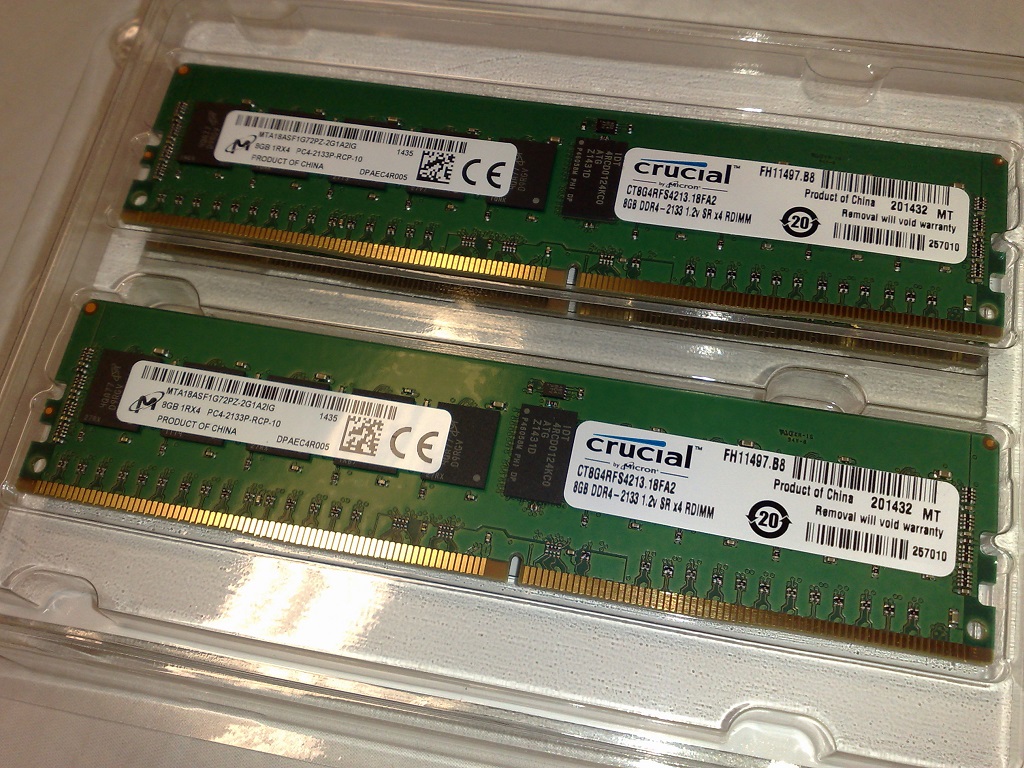 ECC memory-module photo unavailable. Continue with the platform-verification guidance below; the image is illustrative and not required for the decision.
What Does ECC Memory Actually Protect?
ECC stands for error-correcting code. It adds structured redundancy to data so that hardware can recognize and recover certain corrupted bit patterns. The code and its protection boundary determine what can be recovered, not the marketing name alone.
Scope: one codeword is the unit of correction.
Layers: DDR5 on-die ECC is not host ECC.
Compatibility: ECC and registered are different specifications.
Operations: corrected errors still need monitoring.
| Situation | Recommended decision | Evidence required | Stop boundary |
|---|---|---|---|
| New server or workstation | Treat ECC as a system capability, not a DIMM feature alone. | Exact CPU, motherboard, firmware and supported module-type documentation; enabled status after installation. | Do not approve the build while any platform layer or population rule is unclear. |
| Existing ECC event | Preserve the event code, physical location, recurrence and workload impact before swapping parts. | Management-controller logs, operating-system RAS records and the platform diagnostic procedure. | Protect the workload and escalate when an uncorrectable or consumed event affects service. |
| DDR5 listing says “ECC” | Separate DRAM on-die ECC from host-visible system ECC. | CPU and board ECC support, compatible ECC module specification and active-status evidence. | Do not accept “DDR5 has ECC” as proof of end-to-end correction. |
| Replacement or substitute module | Match the exact platform, module architecture, organization and population plan. | Full manufacturer part number, datasheet and approved compatibility/configuration evidence. | Stop if UDIMM/RDIMM/LRDIMM, rank, device width or suffix does not match the requirement. |
A code can verify that a value is consistent with its stored check information. It cannot establish whether software calculated the right value before encoding it. ECC therefore complements application checks, storage protection and backups; it does not replace them.
Why Do Memory Bit Errors Occur?
Dynamic RAM, or DRAM, holds working data as binary values. A bit error changes a zero to a one or a one to a zero. The affected value could represent a number, an instruction or an address. It could also sit in data that is never used again, so the absence of a crash is not proof that every memory operation was correct.
- Soft error
- A transient disturbance, such as electrical noise or a particle strike, changes a value without necessarily leaving permanent damage.
- Hard error
- A persistent fault involves a cell, device, connection or another part of the memory path. Rewriting the value does not necessarily remove its cause.
- Correctable / uncorrectable
- These describe the result of the active correction scheme, not the physical cause. Either soft or hard faults can produce supported or unsupported error patterns.
Background: Dell's PowerEdge YX4X memory RAS primer. Its platform-specific features are not universal server specifications.
What Did a 2.5-Year Server-Fleet Study Find?
In their SIGMETRICS 2009 paper, Bianca Schroeder, Eduardo Pinheiro and Wolf-Dietrich Weber analyzed memory-error measurements from a large server fleet over 2.5 years. They found strong evidence that hard errors, rather than soft errors, dominated the observed behavior.
The operational lesson is to investigate recurrence, not to assume every correction was a random particle strike. This is a historical study of its own hardware population, not a failure-rate forecast for today's DDR5 modules. Read DRAM Errors in the Wild.
How Does ECC Detect and Correct an Error?
A codeword is a protected group of data and check bits. On a conventional system-ECC write, the memory controller generates check information from the data. On a read, decoding hardware checks the returned group for consistency.
The check result is called a syndrome. For an error pattern within the code's correction capability, the syndrome helps identify what changed. The check bits are not a second complete copy of the data; they encode overlapping relationships among bits.
Why a parity bit cannot do the same job
Take the four-bit value 1011. It contains three ones. Adding a parity bit of one makes the total even. One flipped bit breaks that parity, but the check does not identify which bit changed. Two flips can leave the count even and pass unnoticed.
ECC uses more information than this single parity check. Multiple overlapping checks can identify a single-bit position, while an additional overall parity check enables the SECDED distinction in the teaching example below. Microchip AN4480 explains encoding, syndrome calculation and correction in a specific MCU; its memory layout is not a DIMM specification.
Which Errors Can ECC Memory Correct?
SECDED means single-error correction, double-error detection. For this model, count erroneous bits in one codeword when it is checked. Do not count all events across a module, an hour or the system's lifetime as one error pattern.
| Pattern at checking time | Capability | Meaning |
|---|---|---|
| One wrong bit in one codeword | Detect and correct | Includes supported errors in data or check bits. |
| Two wrong bits in one codeword | Detect, not correct | Do not return a guessed correction as valid data. |
| One wrong bit in each of two codewords | Correct each independently | Two total errors are not necessarily a double-bit error. |
| More than two wrong bits in one codeword | No general guarantee | Some patterns may be miscorrected or undetected. |
Scroll tables sideways on smaller screens. Physical placement and interleaving affect how faults map into codewords.
Flip a bit and watch the decoder
This small extended Hamming (8,4) example encodes data 1011 as 01100110, using even parity. It has four data bits, three Hamming check bits and one overall parity bit. It illustrates SECDED; it is not the code layout or overhead of a real DIMM.
Select up to two positions. A selected position is flipped relative to the stored codeword. Select it again to undo the flip.
Received codeword: 01100110. Recovered data: 1011.
Hamming syndrome: 0. Overall parity check: even.
Worked example: flipping position 3 gives 01000110; the syndrome identifies position 3 and the decoder restores 1011. Flipping positions 3 and 5 gives 01001110; the model detects a double-bit error and does not claim to recover the data.
When Do Chipkill or SDDC Provide Broader Coverage?
Some systems use symbol-based correction or capabilities called Chipkill or single-device data correction (SDDC). Depending on controller, DRAM organization and mode, they can tolerate certain failures beyond basic SECDED. Dell's YX4X RAS paper, revision 1.1 illustrates this dependency. Ask which failure patterns are covered by the proposed configuration; “advanced ECC” alone is not a complete specification.
Does DDR5 On-Die ECC Mean the Whole System Uses ECC?
DDR5 DRAM includes on-die ECC inside the memory device. That is useful protection for its internal storage, but it does not by itself protect data traveling outside the chip. Conventional system-level ECC uses a host memory-controller code over its covered memory path.
A DDR5 server can have both layers. A normal DDR5 desktop can have on-die ECC without active host ECC. Therefore, “DDR5 has ECC” does not answer a purchasing requirement for system-level error correction.
Kingston's DDR5 technical overview distinguishes internal correction from errors on the external memory bus. It also lists a 128-data-bit plus 8-check-bit on-die SEC arrangement. That chip-local example is different from the classic 64-plus-8 host-ECC example later in this guide.
 DDR5 module photo unavailable. Use the module datasheet and platform documentation—not appearance—to verify system-level ECC.
Ask the supplier: “Does this exact configuration provide active host memory-controller ECC, or does the description refer only to on-die ECC?”
Which ECC Module Type Does Your Platform Require?
DIMM means dual in-line memory module. ECC describes error protection; unbuffered, registered and load-reduced describe module architecture. An unbuffered module can support ECC. An RDIMM uses a register for command and address signals; it should not be confused with the additional data buffering of an LRDIMM.
| Module description | Meaning | Required check |
|---|---|---|
| Non-ECC UDIMM | Unbuffered, without conventional host-ECC support. | Exact supported generation and configuration; DDR5 on-die ECC is a separate feature. |
| ECC UDIMM | Unbuffered module supporting system ECC. | CPU, board and firmware support for ECC UDIMMs. |
| ECC RDIMM | Registered module supporting ECC. | Explicit RDIMM support and population rules. |
| ECC LRDIMM | Load-reduced module with additional buffering. | Exact server generation, mode and installation rules. |
Kingston's server-memory support guide warns against mixing registered and unbuffered memory. Physical fit is not electrical compatibility. DDR5 UDIMMs and RDIMMs also use different key positions. Never force a module into a socket.
What “32 GB ECC” leaves out
Kingston lists KSM32ED8/32HD as a 32 GB DDR4-3200 ECC unbuffered DIMM, with two ranks, x8 DRAM devices and x72 module width. Its datasheet identifies a specific organization, not a universal substitute for every 32 GB ECC module.
Here, x8 is a DRAM device's data width, not an 8 GB capacity. 2R means two ranks, not two memory channels. A rank is a group of devices accessed together to supply the module's data width. Keep capacity, ranks, device width and module width as separate RFQ fields.
How Do You Verify That ECC Is Supported and Active?
Check the exact processor, board revision, firmware baseline and memory configuration together. Intel's Core X-series support article gives one manufacturer example: even when a CPU supports ECC, motherboard and chipset support still require verification. Apply the same exact-platform check using the documentation for the processor and board you intend to use.
- Confirm documented platform support.Find the system manual, CPU support information and supported-memory list. Check generation, DIMM architecture, per-slot capacity, ranks and population rules.
- Match the actual module.Record the complete manufacturer part number, suffix and installed slot. A family name or reseller title is not a substitute for the datasheet.
- Check the enabled protection mode.Use the manufacturer's documented firmware or management status. Distinguish “supported” from “enabled” and from inventory information.
- Confirm the reporting path.Identify the supported firmware, management-controller and operating-system tools for memory events. Record how their labels map to physical slots.
- Save a baseline.Retain the installed capacity, actual data rate, firmware version, ECC mode and diagnostic result for later comparison.
Linux EDAC can expose corrected and uncorrected events on supported hardware, but drivers and firmware interfaces vary. Inventory fields such as 64 data bits and 72 total bits indicate a module organization; they do not independently demonstrate active correction. The Linux RAS documentation also explains why firmware location labels need careful mapping.
An empty log does not prove perfect RAM, or disabled ECC. A test that passes once does not validate all future temperatures and workloads. Where formal validation is required, use a manufacturer-supported error-injection or diagnostic procedure on a nonproduction test system. Changing memory voltage or timings to induce instability is not a controlled ECC test.
What Should You Do After a Correctable or Uncorrectable Error?
Which Details Should Be Preserved After a Correctable Error?
A corrected error means the protection recovered the affected value. It does not identify the failed component or prove the fault is gone. Record the timestamp, full event code, DIMM location, recurrence, workload and any service interruption.
One isolated report and a rising series at the same location warrant different investigations. Check whether a counter was reset, whether events were aggregated and what interval it covers. Repeated reads of one fault can produce several reports; the count is not necessarily the number of failed cells.
Intel's server troubleshooting guidance ties actions to platform event definitions, recurrence and system impact. Do not transplant a numeric threshold from one vendor's policy into every server.
Why Can Two Uncorrectable Events Have Different Consequences?
Dell's April 2026 troubleshooting guide distinguishes MEM0001, where an uncorrectable event was consumed, from MEM9072, where patrol scrubbing found an unconsumed error. A consumed error can force a restart if the operating system cannot recover; a scrub-detected error may be found before software accesses that location.
The practical distinction is whether bad data entered the execution path, not whether the word “uncorrectable” appeared. These are Dell-specific examples, not universal event codes. Consult the original troubleshooting guide for the affected system.
Treat an uncorrectable report as an integrity and availability incident. Protect the workload, preserve the evidence and follow the vendor's service procedure. A running operating system does not make the event safe to ignore. Review whether important results from the affected period need validation or rerunning.
 Server memory-area photo unavailable. Use the exact slot map and service manual for the affected system before identifying a DIMM location.
What If the Same DIMM Location Keeps Reporting Errors?
Suppose a server continues running while corrections repeatedly map to one DIMM location. This hypothetical scenario does not establish whether the module, slot, connection or controller path is responsible.
Preserve the logs and slot mapping. In an approved maintenance window, follow the documented isolation procedure. If a permitted test moves a module, an error that follows it suggests a different investigation from an error that stays with the slot.
Any reseating or movement should follow the system manual: shut down and remove power as instructed, use ESD precautions, and record what changed. Neither observation alone replaces the final vendor diagnosis. Save logs before clearing them or changing firmware.
How Does Memory Scrubbing Reduce Risk?
Memory scrubbing reads protected contents, corrects recoverable errors and writes corrected data back. Background, or patrol, scrubbing can reach locations the application has not recently read. That reduces the opportunity for a second error to accumulate in an already affected codeword.
Ordinary DRAM refresh maintains stored charge; it is not the same operation as an ECC check. Scrubbing cannot reconstruct every uncorrectable pattern or repair every physical defect. The Linux scrub-control documentation describes the different mechanisms and interfaces.
Keep the layer clear: DDR5 internal error check and scrub concerns the device's array, while host patrol scrubbing concerns the memory subsystem visible to the controller. Use the supported platform settings rather than assuming every feature called “scrub” offers the same coverage.
When Is ECC Worth the Cost and Compatibility Trade-Off?
The main difference is a supported error-correction path, not a fixed speed penalty. Conventional ECC DIMMs supply additional check-bit storage and signal width for the host controller. Non-ECC modules do not provide that conventional arrangement, even though DDR5 chips have internal on-die protection.
Does ECC Take Away 12.5% of the Advertised Capacity?
The familiar 64-data-bit plus 8-check-bit example has 72 total bits. Its additional check-information ratio is:
That does not mean a conventional 32 GB ECC DIMM loses 12.5% of its advertised data capacity, and it is not a performance-penalty calculation. The module supplies the extra storage separately. In-band ECC can reserve ordinary memory, and reliability modes such as mirroring can reduce usable capacity, so verify the architecture and active mode.
Is ECC Slower?
No universal percentage describes every configuration. Code implementation, controller, timings, module architecture and reliability mode all matter. Comparing a server with a desktop changes many factors beyond ECC. Benchmark the intended application with its planned capacity, channels, population and enabled protection; do not disable safeguards on a production machine simply to create a comparison.
When Is a Compatible ECC Platform Worth Choosing?
Prioritize it when an unnoticed error or interrupted job has meaningful consequences: databases, virtualization hosts, scientific workloads, engineering workstations and storage services are common examples. Consider the cost of rerunning work, checking uncertain results and restoring service alongside component and platform cost.
For an illustrative overnight engineering calculation, ECC reduces exposure to covered memory faults, but it does not validate the model or mathematics. For a storage service, it does not replace file checksums, appropriate redundancy or tested backups. Incorrect software output can be encoded perfectly. Power loss, accidental deletion and faults outside the covered path need other controls.
What Should an ECC Memory RFQ Include?
“32 GB ECC RAM” leaves too much room for a technically different offer. Send the system identity and intended population so that alternatives can be compared before approval.
- System and platformServer or motherboard model, revision, processor and firmware baseline.
- Memory architectureDDR generation, form factor, ECC requirement and UDIMM, RDIMM or LRDIMM type. State any required SDDC or other RAS mode separately.
- Population and organizationCapacity per module, quantity, planned slots, ranks and device width where the platform specifies them.
- Exact ordering identityManufacturer part number and suffix, approved alternatives, condition, traceability and warranty requirements.
- Acceptance evidenceDocumented compatibility, configuration differences, installed data rate, active ECC status and supported diagnostic results.
A higher advertised transfer rate does not guarantee a higher installed speed. Controller limits, ranks, DIMMs per channel and population rules can alter the operating configuration. An alternative should be approved against the full requirement, not merely its capacity and connector.
For sourcing preparation, review YURUNOX's purchasing process and quality-assurance information. Keep the compatibility decision tied to the exact host system and manufacturer documentation.
Sourcing memory for a defined system?
Send your system model, processor, existing module part numbers, required capacity and ECC mode. Ask for configuration differences and supporting documents before approving a substitute.
Technical sources used for these ECC decisions
Official technical documentation and original research support the explanations above. Historical examples are identified as such; current system manuals and approved configurations control installation and service decisions.
- Microchip AN4480 — encoding, syndromes and SECDED principles in a specific MCU implementation.
- Schroeder, Pinheiro and Weber, DRAM Errors in the Wild — SIGMETRICS 2009 field study; not a current DDR5 failure-rate estimate.
- Dell PowerEdge YX4X memory RAS whitepaper, revision 1.1 (2020) — fault categories and configuration-dependent advanced correction.
- Kingston DDR5 technical overview — on-die protection and module differences.
- Kingston server-memory support and KSM32ED8/32HD datasheet — module architecture and an exact ordering example.
- Intel Core X-series ECC support guidance — a platform-specific example of why motherboard and chipset support must also be verified.
- Linux kernel RAS documentation — reporting, module widths and physical-location mapping.
- Intel: troubleshooting correctable ECC events — platform-specific service context and recurrence.
- Dell PowerEdge memory troubleshooting guidelines — consumed and patrol-detected errors; updated April 14, 2026.
- Linux kernel scrub-control documentation — correction, writeback and device-specific scrubbing mechanisms.
About YURUNOX: electronic-component sourcing support for engineering and purchasing teams.